
On this page

Google gives you three ways to report a fake or spammy competitor listing: suggest an edit on Google Maps when the business doesn't seem to exist, use Google's Business Redressal Complaint form when the name, phone number or website points to fraud, and report business conduct when a competitor is paying for reviews. Pick the route that matches the problem and include enough detail that Google can confirm it.
Fake listings are a long-running problem in the trades, especially plumbing, garage door and locksmith searches. A Wall Street Journal investigation estimated about 11 million fake listings on Google Maps back in 2019, and Google reported removing more than 13 million fake Business Profiles in 2025. Every fake listing in your market takes a spot in the map results that a real business should have, often yours.
Signs a competitor listing is fake
A fake listing usually breaks one of the same Google rules that get real businesses suspended. Look for:
- A business name stuffed with services and city names, like "24 Hour Emergency Plumber Raleigh," with no matching company behind it
- An address that turns out to be a mailbox store, a virtual office, an empty lot or someone else's business on Street View
- A phone number that goes to a call center that won't name the company, or that shows up on several listings with different names
- A website that's a one-page lead form, or no website at all
- A cluster of near-identical listings that appeared in your area around the same time
Google's guidelines say "lead generation agents for corporations" aren't eligible for a profile, and that virtual offices and remote mailboxes don't count as a business address. Those two rules cover most of what you'll find.
How to report it
1Suggest an edit (the business doesn't exist or isn't there)
- Open Google Maps and find the listing
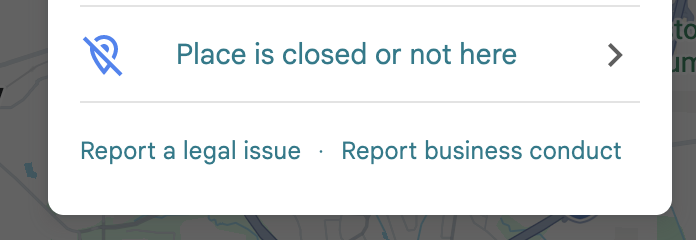
- Select Suggest an edit, then Place is closed or not here
- Select Offensive, harmful, or misleading, then Submit

2Business Redressal Complaint form (suspected fraud)
Use Google's Business Redressal Complaint form when a listing's name, phone number or website suggests fraud. If you're reporting several listings, the form accepts 10 or more profiles at once, or a spreadsheet of their URLs.
3Report business conduct (paid or pressured reviews)
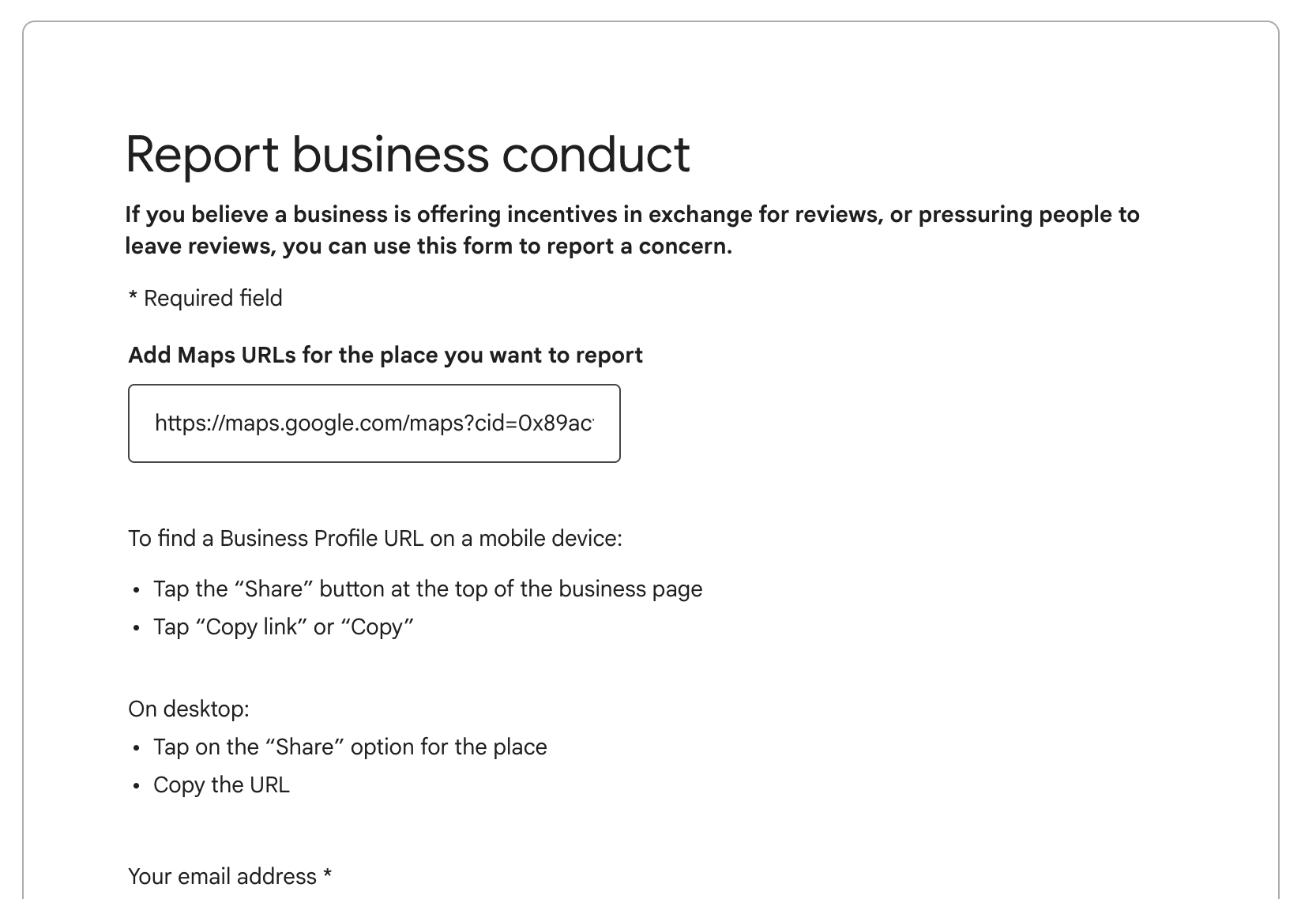
Open the listing in Google Maps, select Suggest an edit, then select Report business conduct at the bottom of the menu. Use this when you believe a business pays for reviews or pressures customers to leave them. The form asks for the listing's Maps URL (use Share, then copy the link) and your email address.
Build your evidence before you report
Google's help page doesn't list what evidence it wants, but a report Google can check quickly is more likely to get acted on. Before you file, gather:
- The listing's name, address, phone number and website, exactly as shown
- A screenshot of the listing
- A Street View screenshot of the address, if it shows a mailbox store, an empty lot or another business
- Notes from calling the number: what they answered with, and whether they'd name the company
- Any other listings that share the same phone number or website
If you're reporting a group of listings, put them in a spreadsheet with one row per listing. The Business Redressal Complaint form accepts that directly.
What not to do
Don't fight fake listings with fake activity of your own. Google's content policy prohibits posting content "on a competitor's place or business to undermine" it, and that includes reviews. Don't report a real competitor just because they outrank you, either. Stick to listings that break Google's rules and report them with facts.
What to expect after you report
Reporting a fake listing doesn't guarantee Google will remove it. What it does is raise the chance that a person at Google reviews it. In my experience, a removal can take more than one report, and days to weeks before Google makes a decision. If the listing is still up, report it again with whatever new evidence you have.
If your own profile was caught up in a spam sweep, that's a different problem. Start with why Google suspends home service profiles. Google typically emails a profile's owner when its status changes, and Porchlight's paid plans check your profile daily in case those emails don't arrive.
Common questions
Will Google tell me if it removed the listing?
Usually not directly. Google typically emails the listing's owner when its status changes, not the person who reported it, so check the listing on Google Maps to see whether it's gone.
Can I report several fake listings at once?
Yes. The Business Redressal Complaint form accepts 10 or more profiles in one report, or a spreadsheet of their URLs.
Is it worth reporting a competitor that's keyword-stuffing its name?
Yes, if the extra words aren't part of its real business name. Use Suggest an edit to propose the correct name.
Sources
- Google: Report a business on Google Maps
- Google: Business Redressal Complaint form
- Google: Guidelines for representing your business
- Google Maps: Prohibited and restricted content
- Google blog: New ways we're protecting businesses on Maps (Apr 16, 2026)
- Search Engine Land: Millions of fake Google Maps listings hurt real business and consumers (2019)
Is your Google Business Profile complete?
A quick check of what Google and customers look at first: whether you've claimed the profile, your description, hours, website and booking link.